Two days at ExCeL. Hundreds of vendors. Thousands of conversations. And yet, walking away from …



Cloud-native POS platform for seamless omnichannel customer experience.

A single hub for all promotions campaigns.

The most advanced synchronization solution for databases and file systems.

Data configuration and batch automation across different disparate systems and vendors.
Two days at ExCeL. Hundreds of vendors. Thousands of conversations. And yet, walking away from …

It’s Black Friday morning. Your stores are packed with customers. Credit card in hand, a …

Physical retail in Europe is in a stronger position than many headlines suggest. New research …

If you run SymmetricDS in production, you know the drill: dozens of nodes, constant data …

Overview Organizations today face the challenge of consolidating data from on-premise and cloud-based systems into …
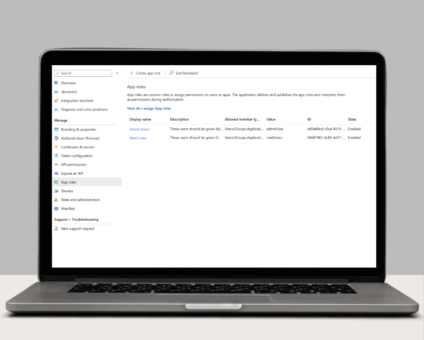
Single Sign-On with OAuth 2.0/OpenID Connect One of the many new features included in version …

Jumpmind Powers Point of Sale and Promotions Execution for Landmark Retail, One of the Largest …

Retail Technology Leader Jumpmind to Enable Mobile Point of Sale and Inventory Management for DTLR/VILLA …

The retailer is charting its next chapter with retail technology modernization to power inspired omnichannel …

LONDON – April 21, 2026 – Jumpmind, a leading provider of innovative retail technology solutions, …
Physical retail in Europe is in a stronger position than many headlines suggest. New research …
If you run SymmetricDS in production, you know the drill: dozens of nodes, constant data …
Cloud-native POS platform for seamless omnichannel customer experience.
A single hub for all promotions campaigns.
The most advanced synchronization solution for databases and file systems.
Data configuration and batch automation across different disparate systems and vendors.

SymmetricDS will continue to capture and retain changes for nodes that are not currently available on the network. This provides a great feature allowing full data sync recovery once the network is re-established. However, there is a trade-off in providing such a hands-off recovery option. The backlog of data being stored for all offline systems can grow indefinitely and slow down replication to healthy endpoints.
Managing these offline nodes becomes essential if they are common in your setup. Understanding how to best deal with them and recovery can keep your sync scenario healthy and performant. There are two factors to take into consideration when handling these offline scenarios.
Planned outages
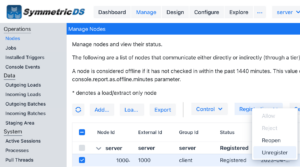
If a node is not going to be available and it is planned for quite some time to be offline or maybe the location is permanently being shut down, this type of node should be unregistered completely from the system. Through the manage -> nodes screen select the node and on the registration button you can unregister the node directly to have it take an immediate effect and changes will no longer be gathered for that node and all existing eligible for purge immediately.
Unplanned outages
Turn on the “Watchdog” job to monitor for offline nodes and unregister them automatically if they pass a certain threshold setting. Setting up such a process ensures a healthy system that will not retain information for nodes that are no longer communicating.
1. Turn on the Watchdog job
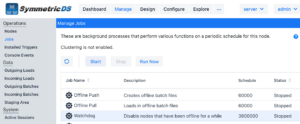
2. Set the parameter that controls the threshold the Watchdog job utilizes.
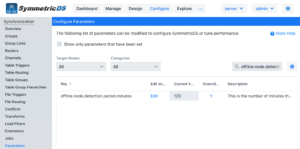
Set the following parameter to a value greater than 0 that will server as your threshold of how long a node can be offline before it is automatically removed from the sync scenario.
offline.node.detection.period.minutes=120
NOTE: Check the frequency at which the heartbeat job runs to set this parameter accordingly. By default, the heartbeat job runs every 15 min so this parameter should be set to a value greater than the rate at which the job runs. The setting above would remove a node after 2 hours if no heartbeats were received.