The store is becoming a relationship, not just a transaction The store is being talked …



Cloud-native POS platform for seamless omnichannel customer experience.

A single hub for all promotions campaigns.

A comprehensive solution designed to simplify and give you ownership of the inventory lifecycle.

A native post-transaction reconciliation module built into Jumpmind Commerce.

The most advanced synchronization solution for databases and file systems.

Data configuration and batch automation across different disparate systems and vendors.
The store is becoming a relationship, not just a transaction The store is being talked …

I spent this week at eTail Boston, and if you looked at the agenda, you’d …

Consumers are expected to spend more than $146 billion on back-to-school shopping this year, and …

Quick answer: Agentic AI systems need data that is current, consistent across systems, available even …
This was our second year at Big Data LDN, and attendance felt just as strong …
Our booth at TDWI Transform this year had a wider range of visitors than we …

Introduction In retail, POS updates have traditionally been quarterly events at best. From October through …

Jumpmind Powers Point of Sale and Promotions Execution for Landmark Retail, One of the Largest …

Retail Technology Leader Jumpmind to Enable Mobile Point of Sale and Inventory Management for DTLR/VILLA …
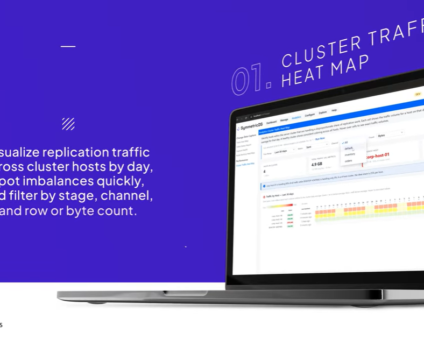
We built 3.18 because the question we kept hearing from customers changed. It used to …

The offering gives security teams a practical path to risk management and accountable AI COLUMBUS …

The insights have implications for retail technology in the store: it must help mind information …
Cloud-native POS platform for seamless omnichannel customer experience.
A single hub for all promotions campaigns.
A comprehensive solution designed to simplify and give you ownership of the inventory lifecycle.
A native post-transaction reconciliation module built into Jumpmind Commerce.
The most advanced synchronization solution for databases and file systems.
Data configuration and batch automation across different disparate systems and vendors.
Cloud POS is point of sale software that keeps transaction, product, and customer data on remote servers rather than on a server in the back of the store, so any authorized connected device can process sales and read current data. The US Chamber of Commerce describes it the same way: data lives remotely, and payments and current information are reachable from connected devices.
The category covers far more than payment acceptance. In a large chain, cloud POS software also carries inventory positions, promotions, returns and exchanges, associate workflows, and the reporting store and district leaders use daily.
Cloud POS splits the work across two places.
Pricing, promotions, customer records, and enterprise reporting run as centrally hosted services. The lane, tablet, or self-checkout terminal in the store runs a local application holding a cached copy of the data it needs to complete a sale.
Transactions are written at the register first, then replicated to the cloud. That is what produces current sales and inventory visibility across many stores without every location maintaining its own back-office server.
Updates and configuration changes ship from the vendor to groups of devices, so a new capability can reach a pilot region before the full chain, with no on-premise server refresh. Integration happens through APIs and event streams into payments, order management, inventory, loyalty, and ERP, with data replication keeping store and enterprise records aligned.
Offline behavior is the part worth scripting into a demo. When the connection drops, a well-designed store application keeps ringing sales, applying promotions, checking cached inventory, and storing payment authorizations for forwarding once the link returns, within the limits the processor and card brands set. Card data itself usually travels an encrypted path from a certified terminal to the processor rather than through the POS application, which narrows PCI DSS scope. Ask the vendor for its current attestation of compliance rather than taking that on faith.
Store systems get managed centrally, so a new location comes online without shipping a server to it. A pricing or promotion change reaches every register at once instead of store by store. Associates get the same catalog, customer, and inventory view on a fixed lane or a handheld, which is what makes mobile selling and line busting practical.
Training tends to get shorter, because there is one screen rather than several. The Paper Store, which went live on Jumpmind Commerce across more than 100 locations in four weeks, measured associate training at 15 minutes, down from 3 hours, across staff ranging from 16 to 80 years old.
| What you gain | What it costs you |
|---|---|
| Central management and remote access to every store’s data | Dependence on connectivity, and offline behavior that differs sharply by vendor |
| Faster rollout of new stores and new features | Subscription spend that continues for the life of the platform |
| Updates shipped by the vendor rather than by store visits | Less direct control over the release calendar and the underlying stack |
| One data model across channels | Migration work off legacy systems: integrations, data cleanup, and store training |
Security deserves its own line. Moving card data off in-store servers can shrink the audit surface, but PCI DSS compliance stays shared. The vendor certifies its environment, and you still own network segmentation, device management, and store-level access control. Ask any provider for its documented responsibility matrix.
Do not assume every cloud POS product behaves alike during an outage. Some capture transactions locally and reconcile later. Others degrade to a restricted mode. Test that scenario in a real store rather than a slide.
Cloud POS fits retailers changing quickly: many locations, frequent promotions, new formats, and store workflows that now include fulfillment, endless aisle, and mobile selling. If pushing a pricing change to 900 stores currently takes a weekend and a field technician, central management pays for itself in release speed alone.
Slow down if your stores sit on unreliable connectivity, if checkout is tangled up in a decade of custom integrations to ERP, loyalty, or scale systems, or if your team has no capacity for a phased rollout on top of its current roadmap. None of those rule out the move. They change the sequencing and the budget.
Cloud-hosted means existing software was moved onto cloud infrastructure. The application logic, data model, and release process often carry over from the on-premise version, which can leave every scan and tender dependent on the link to a central instance.
Cloud-native means the system was designed from the start to run distributed: independently deployable services, continuous releases, and store data synchronized rather than trapped on a back-office server.
The difference shows up in three places. Store resilience, because a distributed design assumes intermittent connectivity and replicates transactions back when the link returns. Update cadence, because hosted software often still ships on the old release calendar. And data replication, because moving prices, promotions, and transaction logs across thousands of locations is an architecture problem rather than a hosting one.
The honest trade-off is that a cloud-native platform still takes integration work, rollout sequencing, and change management for associates. Ask any vendor to document offline behavior, release cadence, and data portability before signing, so exit terms are clear early.
What is cloud POS? Point of sale software that keeps transaction, product, and customer data on remote servers rather than an in-store server, so any authorized connected device can process sales and read current data.
What are the pros and cons of cloud POS? The gains are central management, faster store openings, vendor-shipped updates, and one data model across channels. The costs are dependence on connectivity, ongoing subscription spend, less control over the release calendar, and real migration work off legacy systems.
How does cloud POS work when the internet goes down? A well-designed store application keeps selling locally, applying promotions and checking cached inventory, then reconciles when the link returns. Behavior differs sharply by vendor, so test it in a real store.
Is cloud POS secure? Card data usually travels an encrypted path from a certified terminal to the processor rather than through the POS application, which narrows PCI scope. Compliance stays shared, so ask for the attestation of compliance and the responsibility matrix.
What is the difference between cloud-native and cloud-hosted POS? Cloud-hosted moved existing software onto cloud infrastructure. Cloud-native was designed to run distributed, with store nodes holding their own state and releases shipping continuously.
If you are weighing cloud POS for a large store fleet, talk with the Jumpmind team.