Last year, holiday sales topped $1 trillion for the first time, up 4.1%, according to …



Cloud-native POS platform for seamless omnichannel customer experience.

A single hub for all promotions campaigns.

A comprehensive solution designed to simplify and give you ownership of the inventory lifecycle.

A native post-transaction reconciliation module built into Jumpmind Commerce.

The most advanced synchronization solution for databases and file systems.

Data configuration and batch automation across different disparate systems and vendors.
Last year, holiday sales topped $1 trillion for the first time, up 4.1%, according to …

The store is becoming a relationship, not just a transaction The store is being talked …

I spent this week at eTail Boston, and if you looked at the agenda, you’d …

Quick answer: Agentic AI systems need data that is current, consistent across systems, available even …
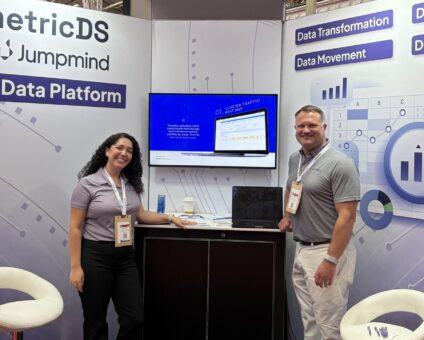
This was our second year at Big Data LDN, and attendance felt just as strong …
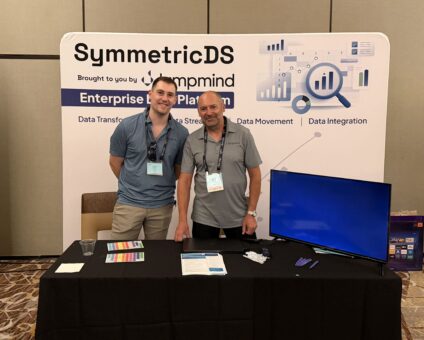
Our booth at TDWI Transform this year had a wider range of visitors than we …

Introduction In retail, POS updates have traditionally been quarterly events at best. From October through …

Jumpmind Powers Point of Sale and Promotions Execution for Landmark Retail, One of the Largest …
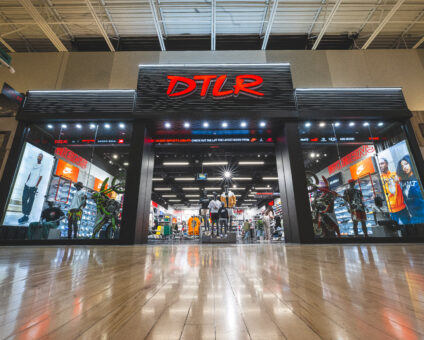
Retail Technology Leader Jumpmind to Enable Mobile Point of Sale and Inventory Management for DTLR/VILLA …
We built 3.18 because the question we kept hearing from customers changed. It used to …

The offering gives security teams a practical path to risk management and accountable AI COLUMBUS …

The insights have implications for retail technology in the store: it must help mind information …
Cloud-native POS platform for seamless omnichannel customer experience.
A single hub for all promotions campaigns.
A comprehensive solution designed to simplify and give you ownership of the inventory lifecycle.
A native post-transaction reconciliation module built into Jumpmind Commerce.
The most advanced synchronization solution for databases and file systems.
Data configuration and batch automation across different disparate systems and vendors.
A legacy POS is due for replacement when keeping it running costs more in risk, labor and missed capability than moving off it would. The clearest signs are an operating system or payment stack that is approaching end of support, a compliance calendar the platform can’t meet without custom work, changes that need a release cycle to reach stores, integrations that break every time another system is upgraded, and associates who work around the register instead of with it. Any one of these can be managed for a while. Three or more at once usually means the platform has become the constraint on the business. Jumpmind builds cloud-native point of sale for enterprise retailers, so we have an interest in this question, and we’ve tried to keep the signs below useful to anyone evaluating their options.
A legacy POS is a point of sale platform whose architecture no longer fits how the retailer sells. Age is part of it but not the whole definition. A seven-year-old system that updates centrally, runs on current hardware and exposes clean APIs may be fine. A three-year-old deployment of a platform designed around a store server, a Windows terminal and overnight batch files can already be legacy.
The practical test is how the platform behaves when the business asks it to change. If a new tender type, a new fulfillment option or a new tax rule turns into a project with a statement of work, the system is setting the pace instead of the retailer.
The signs fall into five groups. Each one is observable from inside the business, without a vendor in the room.
The first thing to break is usually the exception path at the register, because that’s where the most systems meet at once. A standard sale on a legacy platform can run fine for years. A return from an online order, a promotion that should stack with a loyalty reward, or a split tender with a gift card touches inventory, pricing, customer data and payments in the same few seconds.
These are the common failure points, along with who ends up carrying each one:
| What fails | What it looks like on the floor | Who absorbs it |
|---|---|---|
| Cross-channel returns | Online receipts can’t be found at the lane, refunds are keyed by hand | Associate and store manager |
| Promotions at the register | Offers that work online don’t apply in store, or apply twice | Associate, then customer service |
| Inventory answers | The system shows stock the backroom doesn’t have | Associate, then the customer |
| Offline behavior | A network drop stops returns, loyalty or card acceptance | Whole store |
| Reporting | Sales data reaches finance the next morning, after problems are expensive | Finance and loss prevention |
Security exposure sits underneath all of these. The Verizon 2025 Data Breach Investigations Report retail snapshot counted 837 incidents and 419 confirmed breaches in retail, and found that internal data made up 65% of what was compromised while payment data made up 12%. Older store architectures tend to keep more sensitive data sitting in more places, which widens that exposure.
The associate experience tells you more about a legacy POS than any system log. The person on the lane works the platform hundreds of times a shift. When they slow down, apologize to a customer or walk away from the register to find an answer, they’re showing you exactly where the system falls short.
Lauren Cevallos, who leads strategy and customer success at Jumpmind, described the pressure this way when Jumpmind published European shopper research in February 2026: “Associates have to support quick, seamless transactions and more contextually driven service moments… That’s incredibly hard to do on legacy systems.”
A useful exercise is to spend a Saturday shift next to a veteran associate and count the workarounds. Each one is a process the software should own.
The business case for modernizing store technology rests on three numbers: the cost of keeping the current platform safe and compliant, the revenue the current platform can’t support, and the labor spent on workarounds. Most retailers already track the first. Fewer quantify the second and third, which is why modernization cases tend to look weaker on paper than they are in the store.
Retailers are running this math now. Retail Consulting Partners reported in January 2026 that 63% of retailers plan to evaluate point of sale upgrades or replacements during the year.
A case that holds up in front of a CFO usually includes:
You replace a legacy POS without disrupting stores by running old and new in parallel and moving in stages. A pilot store proves the workflows, a regional wave proves the rollout process, and the full fleet follows once both are boring. Hardware that already works can often stay, which removes one of the largest cost and scheduling constraints.
Reitmans (Canada) Limited, which operates more than 400 stores across Canada, selected Jumpmind Commerce in 2023 as a mobile-first platform. Michael Strachan, President of PENN. and RW&CO., described the goal in terms of both customers and staff: “We are embarking on a journey to transform our in-store experience to support a superior shopping journey for our valued customers, and to enhance the employee experience.”
Jumpmind Commerce is a cloud-native POS built for enterprise retailers moving off legacy platforms in stages. It runs on iOS, Android, Windows and ChromeOS, so the operating system decision stops being tied to the software decision. Changes reach stores through central configuration and deployment scheduling, and lanes keep full function through network outages, then reconcile when the connection returns. Jumpmind’s team works alongside the retailer’s IT group through the pilot and every wave after it, with a proof of concept available before a full commitment.
How old is too old for a POS system? There’s no fixed age. The better test is whether the platform can take a new requirement through configuration instead of a development project, and whether its operating system and payment components have a supported future.
Is Windows 10 still safe to run at the register? It depends on the edition. Windows 10 Home and Pro reached end of support on October 14, 2025. Windows 10 IoT Enterprise LTSC 2021 has mainstream support through January 13, 2027 and extended support through January 14, 2032. Confirm the edition on every lane.
What should we fix first if we can’t replace everything at once? Start with the exception path at the register: cross-channel returns, promotions and offline behavior. Those failures reach customers directly and cost associates the most time.
How long does a POS replacement take for a large chain? Timelines depend on store count, integrations and hardware. A staged approach lets the first stores go live early while the rest of the fleet follows in waves.
Can we keep our existing hardware? Often, yes. A hardware-agnostic POS can run on devices already in stores, and replacement can follow the normal refresh cycle.